 Booth
Booth Free
Free
$0
- Inventory
- Cash drawer
- Show POS
- Sales
TCG and collectibles
Tablet POS for vendors at card shows. Inventory, door, Show POS, and closeout stay on the iPad you already carry.
Show POS
The tablet stays at the table. Pick the card, take cash or card, and the sale is on the active show. Buy and trade sit beside it, so the line does not wait on another app.

Live show
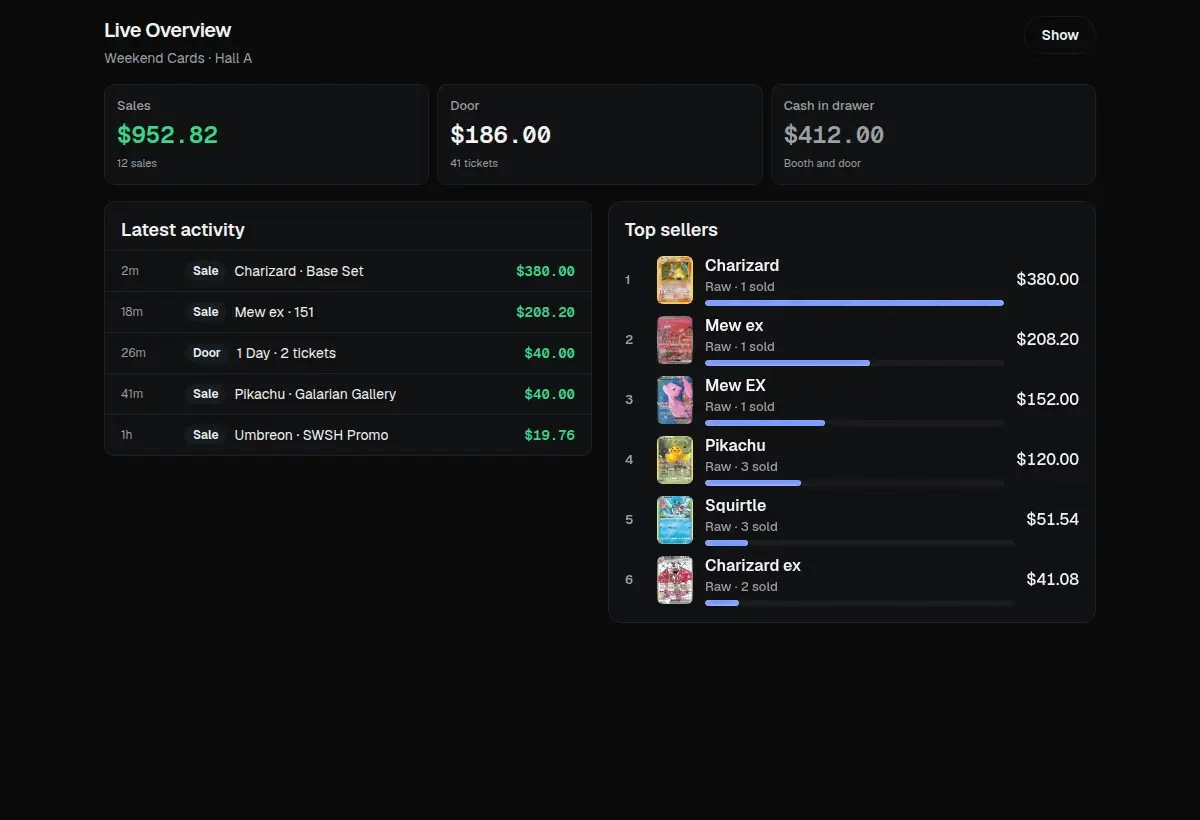
Sales, buys, door tickets, and the drawer update on the live dashboard. Hour by hour, you can tell whether the booth is ahead before tear-down.
Inventory
The booth list is the stock you brought. Search it, change a list price, and mark what still needs a label. Asking prices stay on the row.

Door POS
Tap 1 Day, 2 Day, VIP, or Upgrade to VIP. Cash and card stay with the door drawer, and the live dashboard reads those tickets with the table.

Vendor check-in
Check a vendor in for this show, count badges and wristbands, and keep the signature with the visit. Check-out closes the same row.

Kiosk and showroom
The kiosk faces the aisle with what is in stock. The public showroom is the same booth on a phone, with photos and asking prices. Guests browse. You keep the register.


Labels
Each label carries the name and the asking price.

P&L and reports
Weekend numbers roll up sales, trades, expenses, and profit for that show.

One tablet for the stock, the door, the table, and the closeout.
Raw cards, slabs, and sealed product on one list.
Buy, sell, and trade without leaving the screen.
Sales, door, and the drawer while the show is open.
1 Day, 2 Day, VIP, and upgrade tiles at the entrance.
Badges, wristbands, and a signature for the visit.
A public catalog guests open on their phone.
The in-stock shelf, facing the customer at the booth.
A booth tag with the name, asking price, and code.
Revenue, expenses, and profit when the show ends.
A date range, tenders, and a sales CSV.
Count the drawer and record cash pulled out.
Owner, Manager, and Staff on one booth.
Show day
01
Load inventory, print the labels that still need one, and open the show. Door and check-in stay closed until a show is active.
02
Vendors sign for badges and wristbands. Door POS sells 1 Day, 2 Day, VIP, and upgrades into the door drawer.
03
Show POS runs the table. Guests can browse the kiosk at the booth or the public showroom on their phone.
04
Count the drawer, end the show, and read the weekend numbers: revenue, expenses, and profit for that show.
Pricing
Free runs your booth. Paid adds scanning, market pricing, and the vendor network.
Free
$0
14-day trial
$24.99/mo
Cancel anytime.
Start 14-day trial| What is included | Free | Paid |
|---|---|---|
| Inventory | Included | Included |
| Cash drawer | Included | Included |
| Show POS | Included | Included |
| Sales | Included | Included |
| Scanning | Not included | Included |
| Market pricing | Not included | Included |
| Marketplace | Not included | Included |
| Vendor DMs | Not included | Included |
| Vendor-to-vendor transfers | Not included | Included |
| 14-day Paid trial | Not included | Included |
Show POS can finish a sale while the tablet is offline. The ticket stays on the device and syncs when the connection returns. Sending the same ticket again does not post a second sale.
Yes. The booth is laid out for a tablet at the table.
Yes. Roles are Owner, Manager, and Staff. Owner and Manager see cost and profit. Staff run the table.
Show P&L stays on the show. Accounting can download a CSV of completed sales, and inventory can be exported toward eBay, Shopify, Whatnot, and Misprint.
Inventory, the cash drawer, Show POS, and sales stay on Free. The 14-day trial opens the rest, including scanning, market pricing, Marketplace, vendor DMs, and vendor-to-vendor transfers. Then Paid is $24.99 a month.
Start the 14-day trial, then keep Free or stay on Paid at $24.99/mo.